GroupMe's SMS mode has been around since it launched in 2010 — text a number, get added to a group, and every message arrives as a normal text. No app, no login, works on any phone. That's ending.
Source: GroupMe's official announcement, "Saying goodbye to SMS mode," Aug 17, 2026.
Key dates
- Announcement, and the wind-down begins. GroupMe published "Saying goodbye to SMS mode" and started retiring two-way SMS the same day, group by group.
- Your group's next text
- Your 7-day countdown starts. The next time your group receives a message by SMS, you also get a notice that SMS access is ending. You can keep texting for that week and GroupMe sends reminders.
- 7 days later
- Group messages stop arriving by SMS. From then on you need the GroupMe app or groupme.com.
- No single cutoff date
- GroupMe has not published a universal end date. The timer starts with your group's next message, so a quiet group keeps SMS until someone posts.
What's actually changing
- Your countdown starts on your group's next textGroupMe is winding SMS down on a rolling basis, not all at once. The 7-day countdown begins the next time your group receives a message by SMS — so quiet groups keep access longer, active groups lose it sooner.
- After 7 days, SMS stops working for group messagesGroup texts no longer arrive by SMS at all. You'll need the GroupMe app or groupme.com to see or send anything in the group.
- Verification codes and invite links still work by textSigning up, logging in, and inviting someone by phone number still happen over SMS — it's only ongoing group messaging that's affected.
Who this actually hits
Most GroupMe users are already in the app, so this changes very little for them. The people it hits hardest are the ones SMS mode was built for in the first place: members without a smartphone, members who don't want another app, and members who just always texted the number because it worked. Youth sports teams, faith groups, and community nonprofits with a wide mix of ages and devices are exactly the groups that leaned on this.
If everyone in your group already has the GroupMe app open daily, this doesn't affect you. If part of your group only ever participated by text — flip phones, older members, people who don't want a new app — you'll lose them entirely once their SMS access ends, unless you move to something that still works over plain text.
What still works the same way: RallyText Group Thread
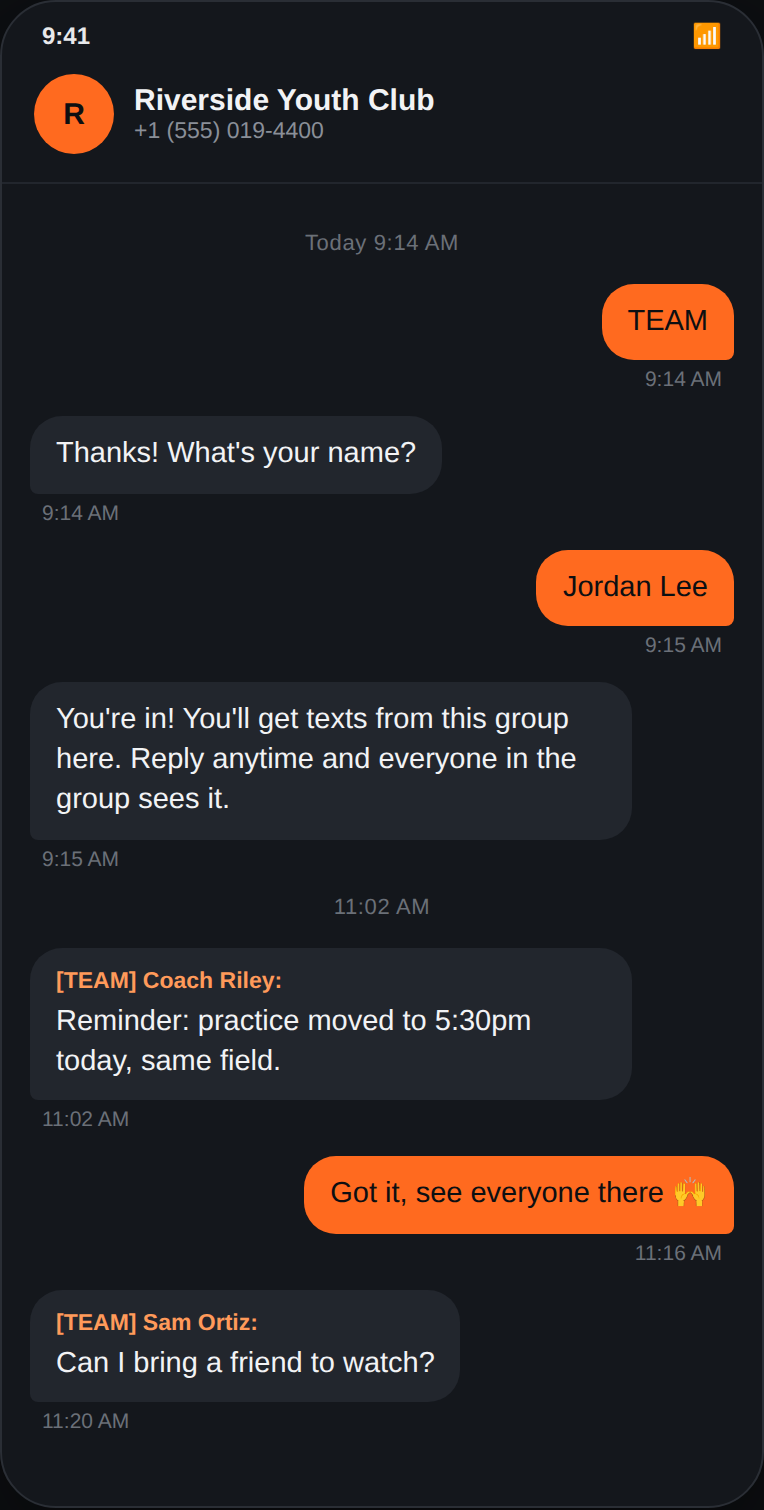
RallyText's Group Thread feature works the way GroupMe's SMS mode always did. Members text a keyword to join, and from then on every message to the group arrives as a plain SMS — no app, no smartphone, no login. Replies fan back out to the whole group the same way GroupMe's SMS mode did.
| Feature | GroupMe (after shutdown) | RallyText Group Thread |
|---|---|---|
| Works without a smartphone | ✗ App or groupme.com required | ✓ Works on any phone that can text |
| Join method | ✗ Account signup in app | ✓ Text a keyword to join |
| Group replies | In-app only after shutdown | ✓ Fan out to group by plain SMS |
| Multiple groups, one number | N/A | ✓ Separate keywords per group under one account |
| Cost | Free (app-based) | From $29/mo — 3-day free trial |
This isn't a general pitch to abandon GroupMe — if your group lives happily in the app, there's no reason to change. This is specifically for the part of your group that relied on the text-only experience GroupMe is now retiring.
Works on phones that only do SMS
A lot of the groups that leaned on GroupMe's SMS mode include members on a kosher phone, a flip phone, or any other basic phone with no apps, no browser, and in many cases no picture messaging. RallyText was built around the assumption that the receiving phone can do exactly one thing: send and receive a plain text.
Moving a shul, kehilla, or community group? RallyText for shuls & synagogues covers kosher phones, Hebrew and Yiddish text, and the gabbai channel.
- Joining is a text. A member texts the group's keyword followed by their name to your RallyText number (or texts the team code alone and answers a short SMS prompt). No link to open, no app, no login.
- Every group message arrives as a normal SMS, labeled with the sender's name. Replies go out to the group the same way.
- No data plan required. Text works on a prepaid talk-and-text phone that has never touched the internet.
What about long messages and photos? Text messages are always sent as plain SMS, no matter the length. A long message is split into several numbered texts by the carrier (about 150 characters each in plain English, around 65 each if it contains Hebrew, Yiddish, or emoji), and every phone that can text receives all of them. The only thing RallyText ever sends as an MMS is a photo that a leader has approved as a picture message; leaders can approve a photo as a plain-text link instead, which reaches phones that block picture messaging.
Move your group in about 10 minutes
- Sign up at rallytext.app/auth/signup and pick the kind of organization you run (congregation, school, team, community group). You choose your team code and get a dedicated local number during signup; no card is needed for the 3-day trial.
- Add your members. Upload a CSV of names and phone numbers, or add people by hand. Anyone you skip can add themselves in step 4.
- Create a Group Thread. In the Groups tab, make a group, give it a keyword (it can simply be your team code), and set its Thread mode to Open. Turn on Auto-join (first the master switch under Settings → Audience, then on the group) so people can add themselves by text.
- Share the keyword and the number. Post "Text KEYWORD and your name to your RallyText number" in your GroupMe group before its SMS access ends. Members send that one text and they are in.
- Send your first message. From your phone, text the keyword followed by your message to the RallyText number, or use the dashboard. Everyone in the group receives it as a plain text.
Setup details, keyword list, and roster import options are in the RallyText guide.
Frequently asked questions
Why plain SMS matters beyond just "no app required"
There's a reliability reason to prefer text over an app-based group chat, not just a convenience one. A text message needs only a basic cell signal, no data connection — on some carriers it can even arrive by satellite when no tower is in range (T-Mobile’s T-Satellite service, built on Starlink direct-to-cell satellites, carries ordinary text messages to compatible phones: T-Mobile) — so it's often the last thing still working when data service degrades or drops entirely. An app depends on a data connection the whole way through, which is exactly what tends to go first in poor coverage or after infrastructure damage. For teams, faith groups, and community organizations that need to reach people no matter what — not just on a normal day — that gap is worth factoring in, not just which app your members already have installed.