I run a:
Don't see your group type? Email us and we'll add custom keywords and titles for your org.
Built by a Level 3 NICA coach · used by MCIC Marquette every season
Trusted by youth sports leagues, school programs & nonprofits
One number for your whole group — no app required
One dedicated business number — employees recognize it, reply rates go up

Text your whole team.
Skip the app.

One text from your coach's phone. Every family on your roster gets it instantly as a plain SMS — no downloads, no logins, no "did everyone see that?". Type ALL practice canceled and it lands on every phone in seconds.

3 days free, then from $29/mo — cancel anytime before day 4, no charge.
No app for families — ever Works from your existing Messages app Most teams ready in about 10 minutes
Built by Kyle Button — Level 3 NICA coach, youth sports director, and software developer. After a lightning storm on a mountain bike trail showed the gap in team communication tools, he built the one that didn't exist.
Northshore Striders
(612) 555-0184
● LIVE
ALL Practice canceled — heavy rain through 5pm. Rescheduled to Thursday same time.
← you type this in Messages app · 14:32
RallyText adds team code + compliance ↓
STRIDERS: Practice canceled — heavy rain through 5pm. Rescheduled to Thursday same time. Reply STOP to opt out. -RallyText
← typed in Messages app · SENT TO 78 · 14:32
Got it — thanks coach! Maya will see you Thursday.
Sarah Aalto · guardian · 14:33
PRACTICE SUMMARY
Coach Hellberg · 14:34 · keyword
Safe Sport & A2P 10DLC compliant
Brand prefix · opt-out · auto-CC parents — automatic.
A2P 10DLC & TCPA compliant
Brand prefix · opt-out · carrier-registered from day one.
Two modes, one platform

Started as a smart pager. Now it's a full conversation.

📟
Every plan includes
Smart broadcast
Coaches send. Members receive. Individual replies come only to staff — not the whole team. Fast, clean, no group chat chaos.
+
💬
Included with every plan
True two-way
Members text a keyword. The whole group gets it. Anyone can reply. No phone numbers shared. Works on every phone — no app. Uses your plan's shared credit allowance.
Staff sends onceFrom Messages or the dashboard
RallyText routes itVerified roster, groups, consent, delivery records
Every phone receives SMSNo app and no exposed phone-number list
Broadcast replies return privately to staff. Group Thread replies go to that selected group.
Both modes are included with every plan and share the plan's credit allowance. See full pricing →
What it feels like

Three moments where one text is the whole job.

Not features. Not workflows. The actual texts coaches and admins send when the situation can't wait.

Coach · weather
4:30 PM

Storm rolls in.

ALL practice canceled
← typed in Messages
78 families get it in seconds. No replies. No confusion.
Athletic director · field change
7:15 AM, game day

Field 3 is flooded.

ALL Game moved to Field 7 — same time
← typed in Messages
142 parents see it before they leave the house. Nobody drives to the wrong field.
Club admin · roster check
Friday, 6 PM

Tryouts tomorrow. 14 families haven't confirmed.

ALL Tryouts tomorrow, 9 AM at Riverside. Reply YES.
← typed in Messages
12 confirm in 20 minutes. You know the head count before bed.
Manager · staffing
5:45 AM

Two call-outs before open.

ALL Anyone able to pick up 8–noon? Half-shift OT.
← typed in Messages
Two yeses inside 4 minutes. Doors open on time.
Owner · early close
3:10 PM

Power-maintenance notice. Closing at 6.

ALL Closing at 6 tonight — utility work. Tomorrow normal.
← typed in Messages
Every employee + supervisor sees it before the rush. No 9 PM "where are you?" texts.
Supervisor · roster confirm
Sunday, 4 PM

New week starts Monday. 7 unread shift reminders.

ALL Confirm tomorrow's shift — reply YES.
← typed in Messages
14 of 16 confirm before bed. Monday morning has no surprises.
⭐ Dedicated number included free on every plan. Employees will see every text from one consistent local number they recognize as your official business line — not a number shared with other teams. Builds trust and increases reply rates.
Coordinator · last-minute change
2:00 PM

Venue cancels.

ALL meeting moved to Riverside Hall
← typed in Messages
Every member sees it before they leave the house. Nobody shows up to a locked door.
Leadership · staff-only
Thursday, 9 AM

Board needs a heads-up before the big event.

COACHES Pre-event brief Saturday 7:30 AM, side room
← typed in Messages
Only your leaders get it. No noise for the wider group.
RSVP / headcount
3 days out

Need a real count for catering.

ALL Reply YES if you're in for Saturday.
← typed in Messages
Replies land in your dashboard — no spreadsheet, no "did everyone respond?" thread.
Inside RallyText

The dashboard when you need it. Plain SMS when they don't.

Staff get one place to send, schedule, track, and follow up. Everyone else keeps using the Messages app already on their phone.
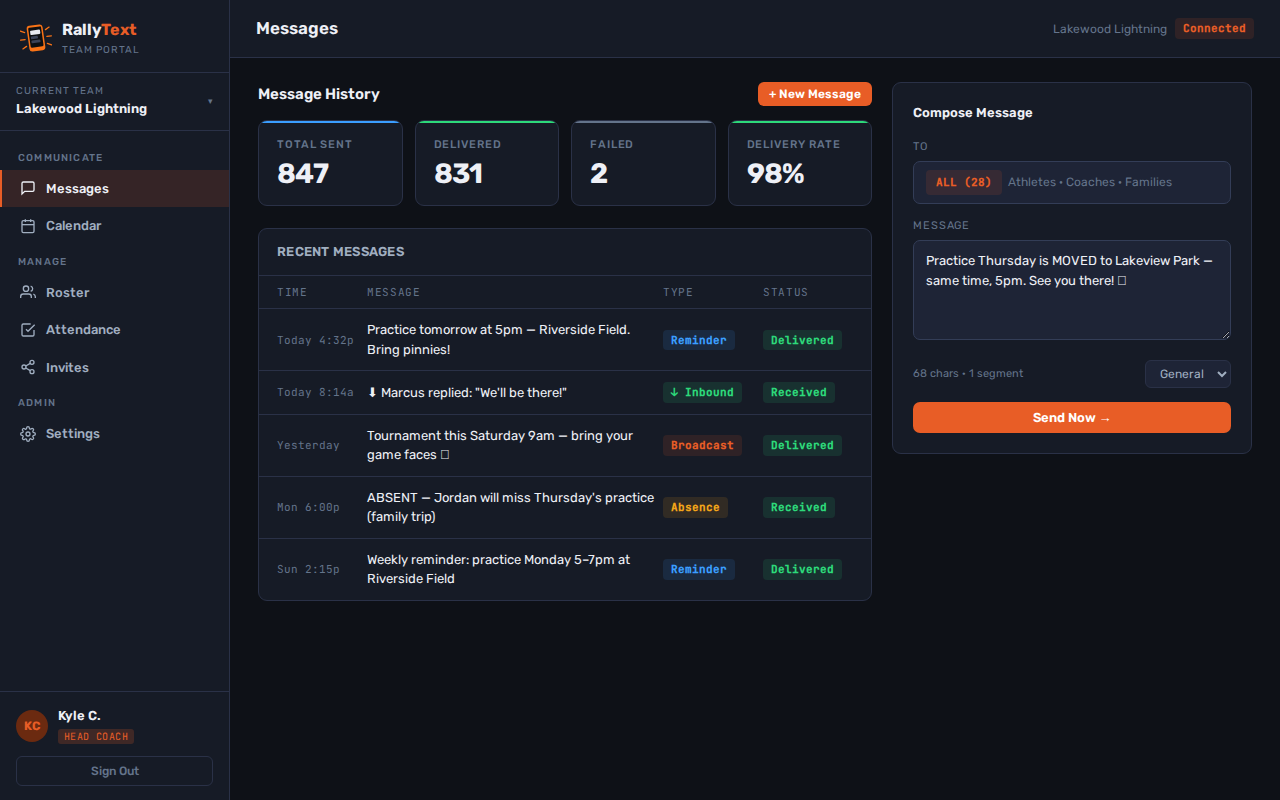
RallyText message dashboard showing delivery totals, message history, and compose panel
Send + receive

Messages and private replies

Compose for the full roster or a selected audience, verify delivery, and keep inbound replies organized without exposing anyone's personal number.
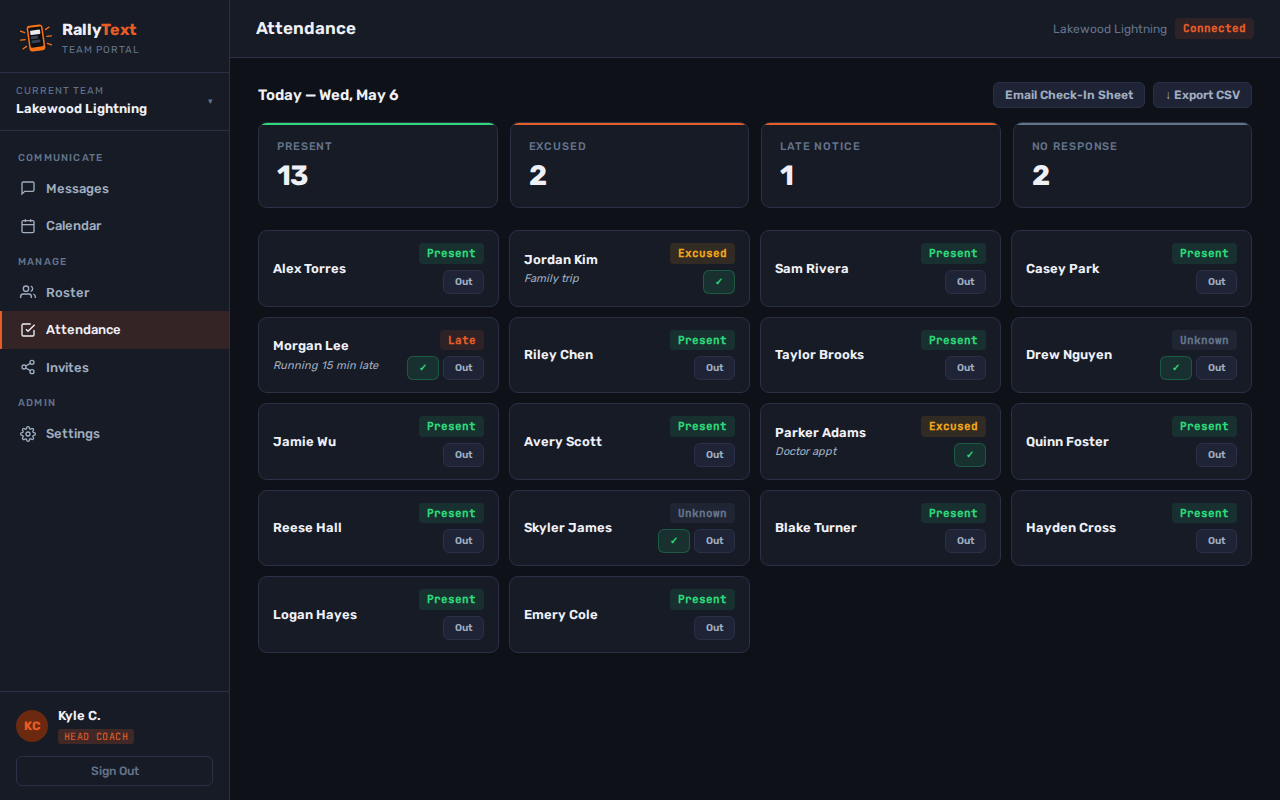
RallyText attendance dashboard showing present, excused, late, and no-response totals
Know who's coming

Attendance that updates from replies

Members respond to event reminders, staff take one-tap attendance, and the history stays available for follow-up or CSV export.
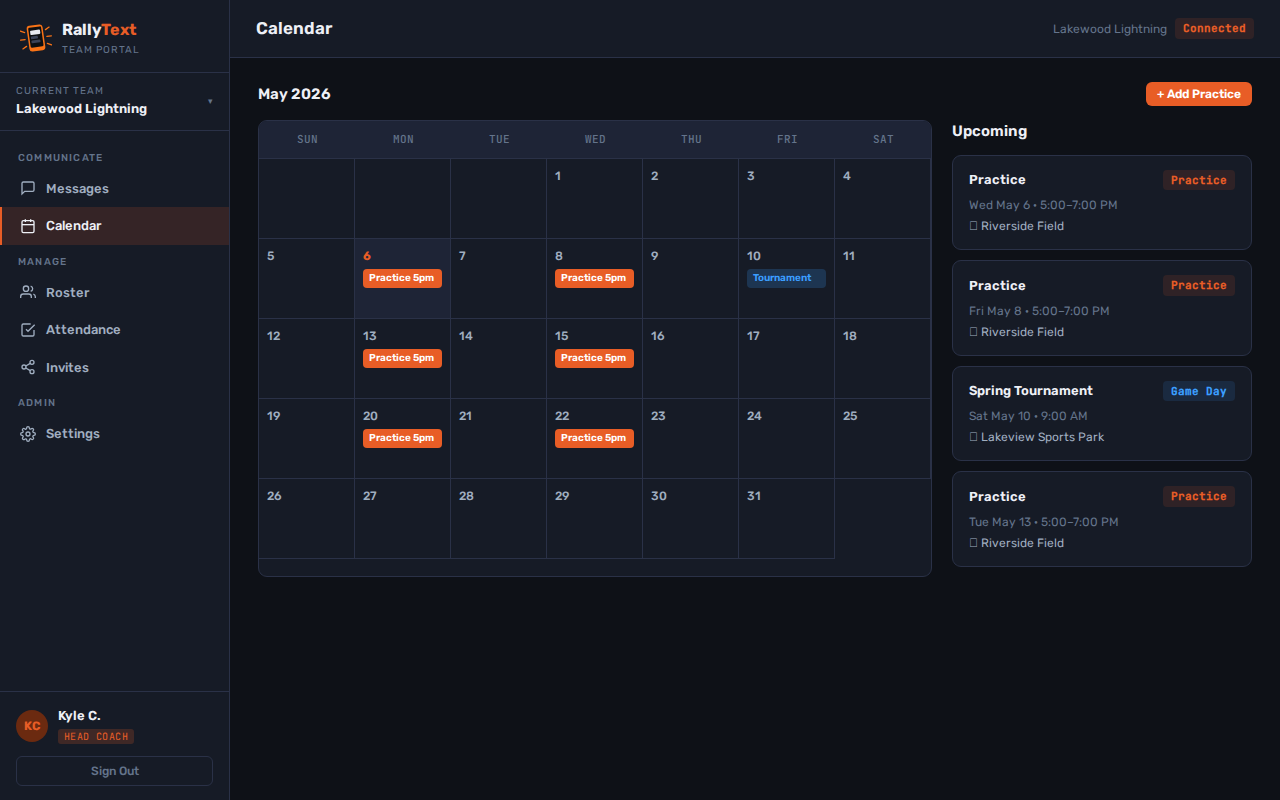
RallyText calendar dashboard for practices and automatic reminder texts
Plan ahead

Calendar and automatic reminders

Add practices, shifts, rehearsals, or events. RallyText sends the reminder and brings responses back into the same dashboard.

Beyond broadcast

Communication tools that work together.

The core workflow stays simple. When your organization needs more, the deeper tools already share the same verified roster and delivery pipeline.

📅

Calendar + reminders

Schedule events and send automatic 24-hour reminder texts with attendance responses attached.

📎

Files + tracked links

Share PDFs, images, maps, schedules, or forms through branded links and see when content is opened.

Automations

Build delayed welcome, first-event, and attendance follow-up messages with delivery history and safeguards.

🗓️

Multi-message campaigns

Schedule 2–20 messages from one start time, then pause, resume, cancel, or retry unsent steps.

📈

Engagement reporting

Review 7-, 30-, or 90-day delivery, replies, attendance, campaign status, and tracked-content activity.

🎯

Groups + custom keywords

Target Varsity, volunteers, a shift, cast, staff, or any subgroup without building another contact list.

The compliance story

Safe Sport isn't a setting. It's how it works.

Most coaches don't have a system forcing the right call — they're just trying to remember. RallyText makes it automatic. Every message to an athlete copies the parents. Every outbound text logs to the dashboard. You send the text; everything else takes care of itself.

Auto-CC a second adult on every athlete DM

There is no "DM your athlete" mode. Every 1:1 message to a minor automatically copies a parent, guardian, or another adult participant — like an assistant coach or team director. Audit log keeps the receipts for your nonprofit board. US Center for SafeSport guidelines ↗

Your texts actually land

The carriers have rules about mass texting — teams that ignore them get blocked. We handle the registration, prefix your messages, and add the opt-out line so your cancellation texts don't disappear into spam.

No wrong numbers on your roster

Everyone verifies their phone before they get added. No typos, no stale numbers, no mystery replies. Your contact list is people who actually said yes.

Free for any youth program

Not using RallyText yet? Get the Safe Sport Texting Checklist anyway.

A one-page guide every coach in your program should follow when texting athletes under 18 — even if you stay with group texts or another tool. Built from US Center for SafeSport guidelines, A2P 10DLC carrier rules, and what an audit will actually ask for if something goes wrong.

  • ✓ When to CC a second adult — and who to pick
  • ✓ The audit-trail mistake most coaches make
  • ✓ Why your personal cell is a board-meeting risk
  • ✓ Carrier rules every team number has to follow
  • ✓ Escalation path if an athlete texts something concerning
No card, no spam. One email with the checklist attached.
Get the checklist
We'll email it to you. Single page, no fluff.
How it works

No new app. You already have everything you need.

01
Open Messages. Type a keyword. Hit send.
This is the part you'll actually do every day. Same Messages app you already use. ALL hits the whole team. COACHES goes to coaches only. FAMILY sends to one athlete and their parents. You text it exactly like you'd text anyone — RallyText figures out who gets it.
ALL
everyone
COACHES
coaches
FAMILY <name>
one family
PRACTICE SUMMARY
log a session
02
Load your roster — one-time, about 10 minutes
Up-front setup, the only time you'll really touch the dashboard. Add your coaches, athletes, and parents. Invite codes go out by SMS or email. Families tap the link to verify their number — that's it. No app to download, not for you and not for them.
Invite code
COACH7K2X
Text JOIN STRIDERS to (612) 555-0100
03
The log takes care of itself
Every message goes out with your team code prefix and opt-out line. Parents get CC'd on athlete messages. Delivery and opt-out records land in the dashboard automatically — useful if your board or league ever asks.
✓ DELIVERED 14:32 · ALL · 78 recipients
↓ INBOUND 14:33 · S.Aalto (guardian)
⊕ CC ADULT 14:34 · M.Aalto's guardian
⊕ STAFF CC 14:34 · ops lead notified
⏳ PENDING 14:34 · D.Castillo (no phone)
✓ VIEWED 14:35 · Message log · dashboard
Text commands

Four words cover most days.

Staff text the team number from Messages. RallyText turns the first word into the right audience or action.

ALLReach the full roster.
COACHESReach staff only.
ABSENTRecord an event absence.
SUMMARYLog or retrieve session notes.
Fundraising by text

Raise money with the community already on your roster.

Create a campaign, share its RallyText donation link, and keep supporters updated from the same place you already manage your group. Donors open a mobile-friendly page—no app or RallyText account required.

Accept one-time gifts and optional recurring gifts through your connected Stripe account.
Text the campaign to your roster or opted-in donors without using monthly plan credits.
Track progress in the dashboard while donor messaging consent stays separate and optional.
01

Build your campaign

Add a name, goal, cover image, and recurring-gift option. RallyText creates a stable donation link you can use anywhere.

02

Share it in one text

Send the campaign to your roster, your opted-in Donors group, or both through the normal consent-checked delivery pipeline.

03

Watch the total grow

Follow campaign progress in RallyText. Recurring donors can manage or cancel their gift through Stripe's customer portal.

Fundraising is available on every RallyText plan. RallyText charges a 1% application fee in addition to Stripe processing fees. Payout timing follows the connected Stripe account's settings. An organization's ability to provide a tax-deductible acknowledgment depends on its own legal and tax status.

For leagues, schools & multi-team groups

Let staff move fast without giving up oversight.

RallyText separates day-to-day team communication from organization-level control. Give each staff member the access they need, add review where policy requires it, and keep a durable record behind every send.

Granular staff permissionsSeparate roster, schedule, messaging, reporting, billing, and settings responsibilities.
Approval policiesRequire review for selected broadcasts and preserve the decision with the message record.
Multi-team oversightGive each team its own roster and number while organization leaders retain consolidated controls.
Emergency accountabilityTrack authorization, delivery, acknowledgments, nonresponders, follow-up, and incident closure.
Household safeguardsModel guardians and delivery preferences without weakening custody-aware recipient controls.
Account securityProtect privileged access with role enforcement, MFA, passkeys, and security-event records.
Who it's for

If you organize it, RallyText handles it.

Started with mountain biking. Now works for any group where one person needs to text the whole roster and have it actually land — sports teams, businesses, churches, clubs, classrooms, troupes, non-profits, anything in between. Same product, the labels adapt to what you call it.

Pricing

Priced for a team budget, not a corporate one.

Pick the plan that matches your message volume, not your roster size. Every plan includes a dedicated number, Group Thread, and a monthly credit allowance. Go over and it's $0.04/credit — billed transparently, never as a surprise.

Team
$29 / mo
billed monthly
Standard team account
2,000 credits/mo, unlimited contacts.
Dedicated number + two-way inbox
Attendance, calendar, summaries, files & Group Thread
Fundraising campaigns + donation pages
Safe Sport auto-CC + A2P 10DLC compliance
Dedicated phone number included
Try Team Free
Organization
$119 / mo
billed monthly
Multi-team controls
8,000 credits/mo, unlimited contacts.
Everything in Team Plus
Multi-team controls + approval policies
Priority support + organization audit tools
Try Organization Free
One-time credits for occasional spikes
Credit packs are best for seasonal events, unexpected volume, and MMS-heavy sends. 3¢ per credit, roll over with no routine expiration. If you need extra credits every month, a higher plan may cost less.
📦
1,000 credits
For a small event or unexpected spike.
$30
📦
5,000 credits
For seasonal peaks and MMS-heavy sends.
$150
📦
10,000 credits
For large events and future RCS capacity.
$300
Credit overage (above your plan limit): $0.04/credit, billed automatically at month end. Fair-use policy →
3-day free trial
3 days free on any plan. Card on file at signup — cancel anytime before day 4 and you won't be charged.
Leagues & high schools
Running a league or high school athletic program with multiple teams? We can set up a group account to make managing all your teams easier. Contact us to set up your league →
Questions about setup or your account? Email us at [email protected] — we typically respond within a few hours on business days.
Security and accountability

Concrete safeguards.
Built into the workflow.

RallyText was architected from the ground up with child safety and data protection as non-negotiables — not features bolted on after launch.

🔒
Two-adult safeguards enforced
Direct staff messages to a minor automatically copy a guardian or second adult. The control is enforced by the system and preserved in the audit record.
🔐
Phone Numbers Encrypted
Per-team Fernet AES-128-CBC + HMAC-SHA256 encryption at rest. Unique key per team. A database breach gets ciphertext — not phone numbers.
🤖
Message screening on-server
Automated message screening runs on RallyText infrastructure before delivery rather than sending message content to a third-party AI cloud.
OWASP-aligned defenses
Role-based authorization, input and output controls, secure session handling, and automated security regression tests cover the major web-application risk categories.

Questions we actually get.

No. They receive a plain SMS on whatever phone they already have. No app, no account, no setup on their end. If they can receive a text, they're in.
Cancel any time from your dashboard — no phone call, no form, no questions. If you cancel before day 4 of your trial, you won't be charged at all.
Yes. Drop in a CSV and your whole roster is loaded in minutes. NICA teams: PitZone exports work directly — no reformatting needed. You can also add members one at a time or send an invite link they join themselves.
Yes. Every direct message to a minor automatically copies a second adult — a parent, another coach, or a team director. This is enforced by the system at all times, not a setting that depends on anyone remembering.
Plans start at $29/month, chosen by message volume rather than roster size. Every plan includes a dedicated phone number, roster management, broadcast SMS, and Group Thread — no separate add-ons to buy. Full pricing is on the pricing page.
Each SMS carrier message part sent to one recipient and each inbound reply uses a credit. Long or Unicode messages can use more than one part. A Group Thread message uses one inbound credit plus the outbound fan-out to its recipients. See the full credit explanation.
Yes. Every current plan includes a dedicated local number at no extra charge, and you choose the area code during setup. Support can also help with a later area-code change.
Yes. Invite multiple staff members and give each person only the permissions they need—for messaging, roster, schedules, reports, billing, settings, or organization oversight.
A reply to a normal broadcast returns privately to authorized staff. A reply inside a Group Thread is shared with that selected group. Personal phone numbers remain hidden in both modes.
No. Current plans include unlimited contacts. Choose a plan based on monthly message credits, not how many people are on your roster.
Yes. Upload a PDF or image and RallyText sends a branded link that opens in any phone browser. Link Clicks shows opens and recent activity without requiring MMS.
Connect your organization's Stripe account, create a campaign, and share its donation link. RallyText supports one-time and optional recurring gifts and charges a 1% application fee in addition to Stripe processing. Donor SMS consent remains separate and optional.
Group texts require everyone to read every message to catch the important ones — and replies go to the whole group. Facebook posts reach maybe 20-30% of your members organically. RallyText sends directly to every phone as a plain SMS, and replies come only to you. It's not social — it's direct.
Sports teams, youth leagues, small businesses, churches, scout troops, nonprofits, school classrooms, theater groups, and community organizations. The labels adapt to your org type — coaches, managers, pastors, troop leaders — so it always speaks your language.
Most teams are ready in about 10 minutes. Pick your org type, import or add your roster, choose a dedicated number in your area code, and send.